The Model Train Layout Project – Choosing Space and Shape
With all these premises out of the way, assuming we have bought at least one starter set and gained familiarity with the simple operation of an electric model train (analog or digital), we can finally design our model train layout.
The first question to ask yourself is “Where are we putting it and How much space do we have available?”.
Later we will talk about dismountable or modular layouts and other solutions to reduce the space needed at home; in the meantime, let’s think about a layout with a fixed structure, which will therefore occupy the available space during construction and also when it is completed.
As mentioned before, we must ensure we also have a small, separate workshop space available to carry out certain processes and store tools.
We adapt the shape of the layout based on the space that will host it
The best thing to do is decide which room the layout will go into and then imagine the scenery according to the location of doors, windows, etc….
The room must be clean and dry. Given that space is never abundant in modern homes, the choice will likely be forced.
…if you have to bargain with the ‘landlady’, don’t make false promises…. our layout will be fixed, and during construction we will create dirt, noise, and clutter…. the living room is not suitable… better to be relegated to the attic, basement, or the small shed at the end of the garden (as long as it is dry and not visited by insects, mice…. and ill-intentioned people…).
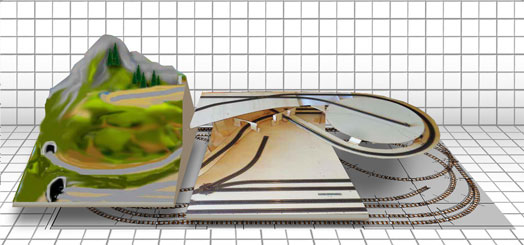
Once the room is chosen, we will make the layout as large as possible, meaning a size of at least 1 meter x 2 meters. In the designs and photos shown on these pages, we will refer to a layout of these dimensions.
Usually, when conceiving a layout, space is never enough, but with some clever adjustments, good results can be achieved.

Verifica il prezzo su Amazon e Ordina un avvitatore elettrico consigliato.
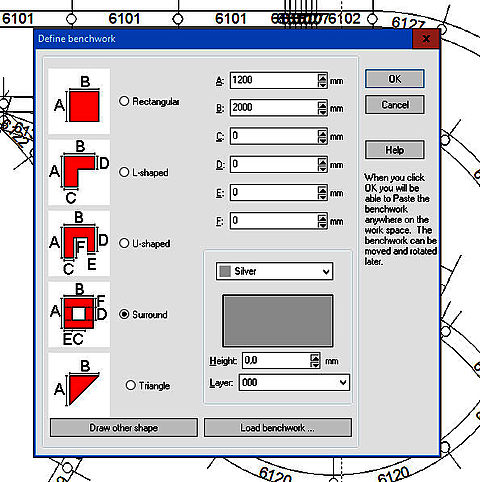
The figure shows a simple diagram of the shapes used most often.
- Rectangular
- L-shaped
- U-shaped
- Around the walls (Surround)
- Triangle